Free · Open source · macOS

Screen recordings,
instantly shareable.

Record. It lands in your Dropbox. Share a clean link. NoCorny Tracer is the open-source screen recorder for designers, PMs, and anyone tired of paying to host their own videos.

Free forever · No account needed for viewers · Your videos stay in your Dropbox
REC00:42
tracer.nocorny.com/v/k7r2-mx9p

Dashboard redesign — quick walkthrough

MMaksym·2 hours ago· 14 views
tracer.nocorny.com/v/k7r2-mx9p Copy
0:42 / 2:18
TranscriptEN · auto
0:00Hey team — quick walkthrough of the new dashboard layout.
0:08I moved the activity feed up here so it's the first thing you see.
0:17And these filter chips are sticky now when you scroll.
0:26Let me show you the empty state — it's a lot friendlier.
0:34Tell me what you think. Loom it back or drop a comment.
How it works

Record, save, share. That’s it.

Three steps. No upload queue, no processing wait, no “your video will be ready in 5 minutes.”

1

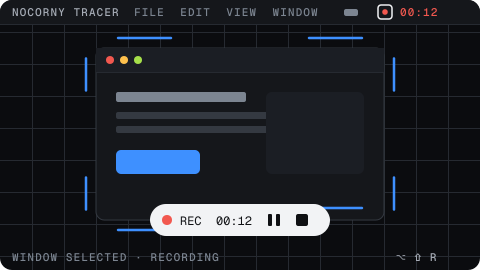
Hit record

A tiny floating panel — start, pause, stop. Global hotkeys if you prefer keys.

REC00:12
2

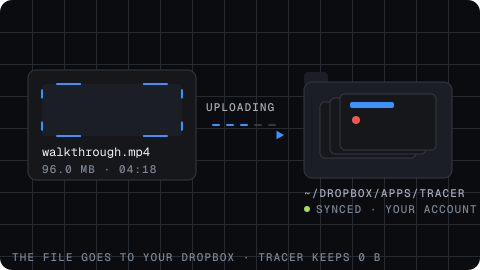
Lands in your Dropbox

The file goes straight to your Dropbox account. We never store your video.

walkthrough.mp4
3

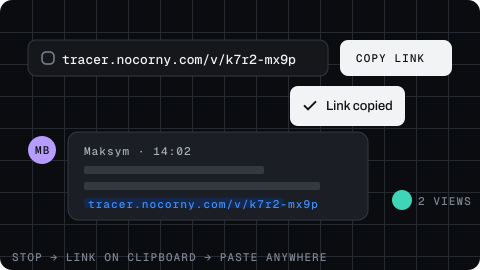
Share the link

Get a clean tracer.nocorny.com/v/... URL the moment you stop.

Features

Built for sharing, not for selling.

Everything you need to record, share, and discuss your screen — and nothing you don’t.

Free & open source — forever.

No subscriptions, no paywalls, no “Pro” tier hiding the basics. Audit it, fork it, self-host it. The Mac app and the web are both MIT-licensed on GitHub.

Your Dropbox, your files.

Recordings upload straight to your own Dropbox. We never touch the bytes. Cancel us tomorrow — your videos are still right there.

AI-generated titles & descriptions.

Stop typing “Untitled recording 47.” Tracer reads the audio and gives every clip a sensible name and summary.

Dashboard redesign — quick walkthrough

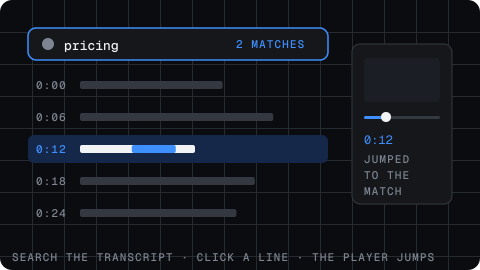
Searchable transcripts.

Auto-captioned and word-searchable. Click any line to jump to that moment.

One-click shares.

The instant you stop recording, the link is in your clipboard. Paste in Slack, ship it.

See who’s actually watching.

Lightweight analytics show view counts and viewer names — no creepy heatmaps, no tracking pixels for the audience.

Your data

Your videos. Your Dropbox. Your control.

Most screen recorders host your videos on their servers — and quietly own the relationship with your viewers. Tracer flips that around.

The recorder uploads each file to your Dropbox account. The shareable page just streams from there. If you ever leave Tracer, nothing breaks: your videos are sitting in ~/Dropbox/Tracer/ exactly where you left them.

  • Zero video storage on our side. We host metadata only.
  • No watermarks, ever. Even on the free tier — because there’s only the free tier.
  • Revoke at any time. Disconnect Dropbox and your videos stop being public.
  • Open source. Don’t trust us — read the code.
Your Mac
Recorder
Your Dropbox
Stores video
Viewers
Watch the link
Notice what’s missing? Tracer’s video servers— because there aren’t any.
FAQ

Frequently asked questions

Is it really free?
Yes. Tracer is open-source and free forever. There is no paid tier, no premium add-ons, and no “starting at $0/month” trick. It's built and maintained by NoCorny Agency as a public good.
Why Dropbox specifically?
Dropbox is the simplest way to give every user real, portable file ownership without us building a storage backend. Your recordings live in a folder you already trust — and you can open, delete, or move them outside of Tracer at any time. Other providers may come later.
What if I disconnect Dropbox?
Existing share links stop streaming (since the file isn't accessible anymore), but your video files are untouched in your Dropbox. Reconnect and everything works again.
Do my viewers need an account?
No. Viewers click the link and watch. There's no sign-up wall, no email gate, and no paywall in front of your content.
What about Windows or Linux?
The recorder is macOS-only today. The web app is cross-platform — anyone can sign in to manage videos, but recording is Mac-first for now. Contributions on GitHub are very welcome.
How does the AI titling work?
Once your file finishes uploading, Tracer transcribes the audio and uses a small language model to generate a title and a one-paragraph description. You can always edit them — and you can disable AI features in settings.
Is this affiliated with Loom?
No. Tracer is an independent open-source project from NoCorny Agency. We just like the workflow Loom popularized — but think it should be free, transparent, and yours.

Stop renting your screen recordings.

Free, open source, and yours. Take it for a spin — it’s a 12 MB download.